
Enrolling learners in a course is an essential step in preparing students for success! Students can be enrolled either through self-enrollment during the defined course enrollment period, or students can be enrolled by the instructors and staff members of a course. Course instructors and staff also have the ability to unenroll students as well.
Overview
To get started with enrollment, a learner must complete the following steps in order to successfully enroll in a course.
- Register a user account, which includes supplying a valid email address, on SkilRedi.
- Activate the registered account by following the emailed instructions.
To enroll learners or course team members, follow these steps.
- Log in to SkilRedi with your instructor or staff account.
- Navigate to the course of interest.
- Select Instructor, and then select Membership.
- In the Batch Enrollment section of the page, enter the username or email address of the learner. You can enter multiple usernames or addresses separated by commas or new lines.
- You can copy and paste data from a CSV file of email addresses.
- For Role of the users being enrolled, select learner.
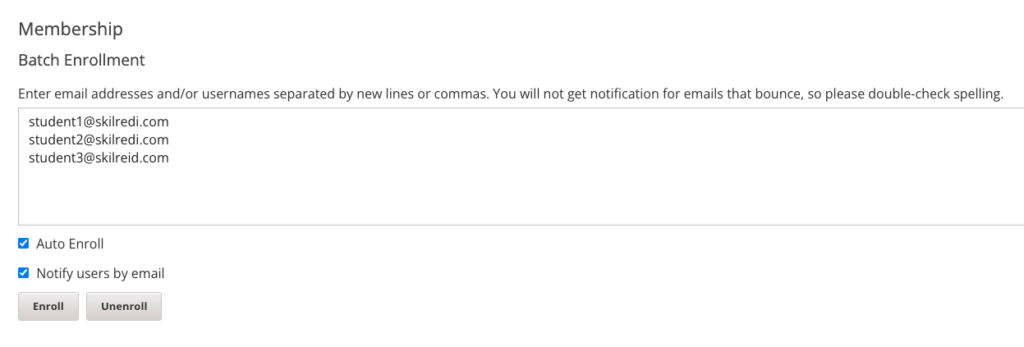
- To streamline the course enrollment process, leave Auto Enroll selected.
- To send learners an email message, leave Notify students by email selected.
- Select the Enroll button.
Leave a Reply
You must be logged in to post a comment.