
Please follow the directions below to enroll staff or instructor users to your course.
Course Team Management
Follow these steps to enroll a user that will have elevated privileges for the course.
- Select the appropriate role for your user. Please refer to the sections below concerning the different roles available to the platform.
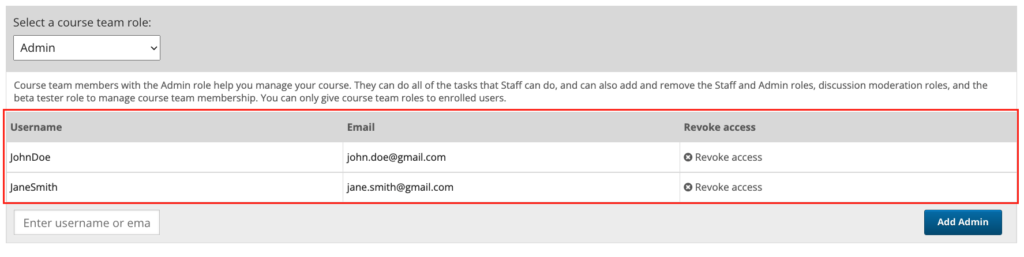
- Verify that the user doesn’t already exist. See image below for Existing Administrators.
- Enter the username or email for the user, then click Add Role
Team Roles
Here are a couple team roles available and their privileges:
Staff Role
Course team members who have the Staff role can complete the following tasks.
- View the course before the course start date.
- Enroll and unenroll learners.
- Access and modify grades for individual learners. For example, users with the Staff role can reset an individual learner’s attempt to answer a question.
- See course HTML errors.
- Send email messages to course participants.
- Activate course certificates.
Admin Role
Course team members who have the Admin role can complete all the tasks that team members who have the Staff role can complete. In addition, they can complete the following tasks.
- Access and modify grades for all learners in a course. For example, users with the Admin role can reset all learners’ attempts to answer a question.
- Add team members to, and remove them from, the Staff role.
- Add team members to, and remove them from, the Admin role.
Leave a Reply
You must be logged in to post a comment.